Any users who have not yet upgraded to Version 6 should contact TangoWare about upgrading. Please note that Version 6 is considered a major upgrade.
Version 6 of the AVM-2000 software has been completely re-programmed for Microsoft Windows VISTA-compatibility, but is still compatible with Windows XP-SP2. Version 6 of the AVM-2000 will also run on the Windows 7 and Windows 8 operating systems.
IMPORTANT NOTES:
- Before completing the update to 6.50A or above, users must have each of their AVM-2000 workstation computers set to a minimum computer monitor screen resolution of 1024 x 768
You can check your current resolution by right-clicking on your computer desktop and selecting Properties. Then click the Settings tab. Look at the values for Screen resolution. If the value is greater than or equal to “1024 by 768”, you do not need to make any adjustments. If the value is less, then you can usually adjust your resolution to a larger size by moving the arrow towards “More”. Be aware that this will change the screen resolution for your entire computer and all software; not just AVM-2000
- Users upgrading from Versions 4 or 5 must be aware of the multi-user workstation licensing protection in Version 6. Check with TangoWare to find out how many workstations your AVM-2000 is licensed for before upgrading from Version 4 or 5.
- Users who run their Invoice Sales Tax reports from AVM-2000 should be aware that changes were made in the explanation and reporting modules that will require close attention during the first month of use in AVM-2000 6.50
The Version 6 Upgrade may be downloaded from the Download 6 web page.
The following pricing applies for Version 6:
$ 695.00 - WITHOUT an AMA - Initial Upgrade
$ 395.00 - With a current AMA - Initial Upgrade
$ 395.00 - WITHOUT AMA - Vs 6 Updates after Initial Upgrade
$ 000.00 - With a current AMA - Vs 6 Updates after Initial Upgrade
Notes: All prices subject to change without notice. Support services are not included in the cost of the upgrades. Any support services provided for upgrades or upgrade features may be charged additional under our Support Policies. All files provided by download from the internet.
The new items listed below are included in the most recent upgrade.
6.51B_226 - Apr-17-2023
- Reports > WO > 1 List By Query - FIX - corrected non-recoverable errors when querying on specific fields such as part number.
6.51B_219 - Jul-25-2022
- Custom Work
6.51B_218 - Feb-10-2022
- Admin > Global Config > Work Orders > 1 General > Other > Force WO Browse page to remember last column positions at each workstation - NEW - option to allow users at individual workstations to reorganize the order of the columns on the WO > Browse grid and remember the order each time WOs is closed and reopened.
- Admin > Global Config > Inventory > 1 General > Main > Force Browse page to remember last column positions at each workstation - NEW - option to allow users at individual workstations to reorganize the order of the columns on the Inventory > Browse grid and remember the order each time Inventory is closed and reopened.
- Work Orders > Main > Close - NEW - warning message added if there are any open requisitions. Users still have the option to proceed with closing the Work Order with open requisitions.
- Reports > Invoices > 1 > Run > Export Query Results button - Fixed - a problem where XLS files were not saved when exporting from the Query form was fixed. (Note: Export button from the main Report screen was working correctly.)
- Custom work modification
6.51B_216 - Jan-04-2022
- Reports > WO > 5 - Simple Main WO - NEW - additional reporting options for queries on open, closed, invoiced Work Orders with optional restrictions for WO Suffix, Customer Code, Tail #, etc.
- Entries > PO Quick Requisitions - fixed issue where clicking in the Description field caused the cursor to "jump around"
6.51B_213 - Oct-18-2021
- Reports > WO > C - Budget Hours Reporting - NEW - reporting feature with XLS export and printout for the Work Order Labor Budgeting functions from the WO > Details 2 screen.
6.51B_204 - Aug-24-2021
- WO > Browse/Search/Query and Reports > WO > 1 List by Query - NEW - three new fields have been added to the XLS export: Component/Equip Part Number, Model Number and Serial Number (fields from the WO > Details screen).
- Admin > Utilities > Send Files to CTI - Fix - corrected a problem where one of the configuration files (CONFIG2.*) was not being copied into the files to send to CTI
6.51B_201 - Jul-13-2021
- WO > Other > Add Trades to Inventory - NEW - "Enable Trade to Inventory" function added to allow flexibility on cost and list when adding trade items to Inventory. Users can now choose to use Normal, Reverse or Editable Cost/Sell to save to Inventory. The cost and list values saved to Inventory can differ from the values entered on the Trade line item, which will affect the Work Order values. The "Normal" choice behaves the same as the previous Add Trades function always has.
6.51B_196 - Mar-31-2021
- Custom work modification
6.51B_190 - Mar-16-2021
- Custom work modification
6.51B_187 - Mar-02-2021
- Custom work completed
6.51B_176 - Dec-27-2020
- PO Receive / WO Other > Shipping - NEW - A configuration option is available in Admin > Global Config > POs & Expenses > Allow users to add shipping costs directly to WOs. If a PO line item originated from a WO Requisition and is being received to the WO, AND a Ship cost has been entered against the line item prior to receiving, users will be prompted to charge Shipping fees back to WO > Other.
6.51B_166 - Oct-27-2020
- Custom work completed
6.51B_165 - Oct-06-2020
- Reports > Work Orders > 3 WIP - NEW and Fix - New options for exclusions for "zero dollars" include Never, Sell, Cost or both. The fix now includes negative valued Work Order tasks.
6.51B_161 - Sep-24-2020
- Databases > Test Equipment > Browse/Search - NEW - Description column added with search field
- Custom work completed
6.51B_158 - Jun-18-2020
- Custom work completed
6.51B_157 - Jun-11-2020
- Attendance Time Clock > Where's Everybody - Security control added to prevent users from viewing the page. Users with Security who require access to this page will need to edit Security Control Permissions to allow access to view this page.
- Reports > Inventory > 1 Detailed Query > Main - Fixed isolated issue with duplicate serial entries on the report when Batches are not in use.
- Custom work completed
6.51A_154 - May-21-2020
- Reports > ATC > 1 Detailed Query > Print - Fixed intermittent issue where the printout header was incorrectly labeled
- Custom work completed
6.51A_146 - Apr-27-2020
- Custom work completed
6.51A_146 - Apr-24-2020
- Work Orders > Tasks - Fixed problem where the task entry row in the grid could not be seen/accessed when configured for Single Appliance Use
- SECURITY Control Permission for Vendor "Allow Edit Approved" - new CONTROL PERMISSION to allow or deny access to the Vendors > Order Info & Account > "This is an Approved Vendor" check box. Users will be denied access to this check box until users' Security Control Permissions are modified after the update.
- Vendors > Order Info & Account - new reference only field for "Non-Aviation" Vendor.
- Custom work completed
6.51A_145 - Apr-20-2020
- Custom work completed
6.51A_137, Apr-07-2020
- Custom work completed
6.51A_129
- Custom work completed
- ATC >Where Is Everybody - program code added to help prevent intermittent Update Conflict error
- ATC - F9 key disabled to prevent unauthorized user access prior to Security log in
6.51A_128, Jan-30-2020
- Custom work completed
6.51A_126, Jan-23-2020
- Custom work completed
6.51A_105, Oct-22-2019
- Custom work completed
- PO's & Expenses > Exchange/Repair > Edit buttons - fixed intermittent non-recoverable error
6.51A_099, Oct-08-2019
- Custom work completed
6.51A_097, Sep-24-2019
- Databases > Kitting > Create Kits > Create Multiple Kits - fixed issue where the Inventory History entry showed an incorrect quantity used when more than one kit was created at a time; however the Inventory QOH is properly adjusted.
6.51A_096, Aug-13-2019
- WO > Tasks > Add > From Quote Item - fixed intermittent problem where part and equipment items did not always transfer to Requisitions correctly.
6.51A_093, Jul-23-2019
- Custom work completed
6.51A_079, Apr-30-2019
- Custom work completed
6.51A_077, Apr-25-2019
- WO > Details 2 > Print Estimate Authorization - fixed intermittent error where CRS# did not always print. (Temporary work-around prior to update is to print the Authorization from the Tasks page once before printing from the Details 2 page).
- WO > Details > Manual Used > EDS - fixed intermittent error where the EDS button did not always pull the correct manual ID# document to match the ID# entered for the task.
6.51A_076, Apr-23-2019
- Custom work completed
6.51A_075, Apr-16-2019
- Custom work completed
6.51A_074, Apr-12-2019
- Reports > Invoices > 5 Special Financials - new report listing for Posted invoices with query options for Invoice date and/or Posted date with XLS export or printout choices.
- Custom work completed
6.51A_067, Mar-12-2019
- WO > Browse > Query - fixed isolated query error with WO Brief Descrip field
- WO > Tasks and Details > Print > Shop & Customer printouts with pricing - fixed rounding error with part sell values with three decimal places. Sometimes the Parts Sell Total or Parts Profit Total was off by 1 cent.
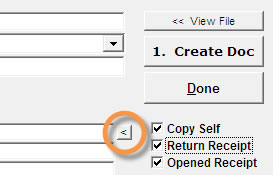
- Print to File - NEW - For users with web-based email addresses that will not work inside AVM-2000, a new button for "MailTo:" has been added to the Print to File form (see below). This button opens your default email compose window as configured in your Windows operating system. This button will only work once an email address has been populated into the "Email To" field. While this does not have the same functionality as the built-in AVM-2000 email functions, it does save some steps and makes it easier to email Print to File created documents.
6.51A_060, Feb-18-2019
- WO > Browse > Query - fixed isolated query error
- Custom Work completed
6.51A_058, Feb-12-2019
- Admin > Utilities > Remove Demo Records - modifications to ensure removal of TBO Components demo records
- WO > Tasks > Delete - fixed delete task issue introduced in version 6.51A_057 only.
6.51A_057, Feb-05-2019
- Admin > Utilities > Remove Demo Records - modifications to prevent "File in use" error
- Admin > Global Config > Work Orders > 1 General > Other - new configuration option to allow each workstation to remember the WO > Tasks grid column order. Users can move columns and they will be remembered every time the WO > Tasks is opened on that workstation.
- WO > Tasks > Filter - new drop-down option allows users to filter the Tasks List to Open WOs only, OR to a specific Task Type.
- Custom Work completed
6.51A_049, Jan-17-2019
- Admin > Global Config > Bookkeeping > 1 GL Setup > Main Accounts > P & L Reporting - Minor modifications to improve selecting a classification for a GL that is "Not Assigned"
- Custom Work completed
6.51A_034, Sep-04-2018
- Reports > P & Es > 4 Requisitions - New XLS export
- Custom Work completed
6.51A_017, Jul-03-2018
- WO > Other > Trade Ins - fixed NRE when serial existed in Inventory previously, but is not currently in stock
- Reports > Employees > 4 Training - fixed query restriction for Status to filter properly
- Quotes > Main > Print - Simple and Detailed Customer printouts include Address 2 from Global Configuration
6.51A_014, Jun-07-2018
- WO > Other > Trade Ins - fixed button Security issue.
- 8130s > Update from WO - new configuration choice added for Block 3 to use a combination of the Work Order # and 8130 ID #, such as 18549(7726) where 18549 is the WO# and 7726 is the 8130 ID #.
- Custom Work completed
6.51A_011, May-24-2018
- WO > Other > Trade Ins - added a column for WHS for users with the WareHouse function turned on. This will help store items to the correct Inventory entry and help prevent receipt of duplicate serial numbers.
- Custom Work completed
6.51A_007, May-15-2018
- Custom Work completed
6.51A_001, Mar-20-2018
- Reports > Inventory > 1 Detailed Query List > Main > QOH is at or below Low Limit - corrected an error where some items did not appear in the list when the QOH was zero and the Low Limit was set to zero
- Entries > Packing Slips > Main > EDS - corrected a problem with the location where Packing Slip EDS files were being stored (local AVM2KWS folder instead of shared configured EDS folder) They will now be stored to the PACK_SLIPS subfolder in the configured EDS folder
- Transactions > Customer Credit Memos - fixed a QuickBooks(R) Integration problem to properly mark Credit Memos as candidates for QB Transfer as configured
6.50Z_164, Feb-20-2018
- Entries >POs and Expenses >Auto POs >Export to XLS - WHS added to export
- Entries >ATC Entries > Clock In/Switch/Log Out button - additional program code added to ensure users have selected a valid Work Order number
6.50Z_163, Dec-22-2017
- Custom work completed
6.50Z_161, Dec-12-2017
- Custom work completed
6.50Z_158, Nov-14-2017
- Custom work completed
6.50Z_146, Aug-22-2017
- WO > Details 2 > Estimate Authorization Other $ field - New - Allows users to enter a negative value to account for a trade-in.
- Inventory > Other > Update Shelf Bin from Spreadsheet - New - Users may update shelf bin location fields for multiple SKU numbers simultaneously using a specifically formatted XLS file.
- Custom Work Completed
6.50Z_143, Jun-19-2017
- Custom work completed
6.50Z_141, Jan-31-2017
- WO > Tasks > Print > 10 - New - Print choice for WO Discrepancy List with 3 tasks per page. New field in Admin > Global Config > WO > 1 General > Printing > WO Shop Continuous Discrep 3/pp Form # to enter new form number.
6.50Z_137, Dec-27-2016
- Admin > Utilities > Send to CTI - This function was updated to reflect TangoWare's new FTP service. It is HIGHLY recommended that all users complete this update!!
6.50Z_133, Oct-11-2016
- Custom work completed
6.50Z_132, July 28, 2016
- Custom work completed
6.50Z_131, July 25, 2016
- Reports > ATC > 2 > Order Report by Employee - Fixed intermittent error where some employees with the same last name were subtotalled together on the report
- Admin > Global > WO > 1 > Authorization Estimates > Mark all new tasks as active estimates checkbox - NEW - When this checkbox is marked, all new, copied, moved, template, create from quote tasks, etc. are marked as active estimates on the Details 2 page.
- WO > Tasks > Populate blank Estimate text for all tasks button - NEW - Copies WO > Text > Discrepancy text to the Details 2 > Estimate Authorization Detail Text field only when the Estimate Authorization Detail Text field is blank.
- Inventory Kitting > Create Kits > Main > Print > 2 KIT with BOM Details (Excludes Costs) - NEW - printout added for Kit BOM that does not show pricing
6.50Z_128, Jun-30-2016
- Custom work completed
6.50Z_126, Jun-10-2016
- Transactions > AVM to QuickBooks Integration Manager > P&Es to Bills/CCC > - Fixed problem where attempting to transfer RGO records to QuickBooks reported an error with G/L values
- Documentation > 8130s > Main > Block 14d/14c - Fixed problem when configuration is set to use Repair Station Number, and Enable QuickFills is turned on; where if user emptied the Name 14d field, the 14c field would empty out and users could not re-enter the Repair Station Number
6.50Z_123, Apr-29-2016
- Employees > ATC > Bank Add - Fixed intermittent problem where adding bank hours would not increase the Total Hrs in Bank
6.50Z_122, Apr-18-2016
- Invoices > Cores & Other > Print > 1 - Fixed problem where WO Suffix only printed 2 of 3 characters.
6.50Z_120, Feb-01-2016
- P&Es > Receive - Fixed an obscure "Open" error when receiving WO Requisition items back to a Work Order.
- P&E Reports - Modified report results to show RGOs as negative values
- Invoices > WO # - Fixed WO Suffix to show up to three characters on-screen and on printed invoices
6.50Z_117, Dec-28-2015
- EDS (Electronic Document Storage) Module - NEW - EDS buttons were added to the Main pages of Inventory, Customers, Vendors, Employees and P&Es. Existing buttons remain on the "Other" pages of these forms as well.
- Admin > Security - fixed an intermittent "Keyfield" error
6.50Z_113, Dec-14-2015
- Admin > Utilities > Purge - fixed an intermittent "File in Use" error
- Admin > Utilities > Purge - NEW - Work Orders purge allows users to choose between Start Date range, or Closed/Finished Date range
6.50Z_112, Nov-17-2015
- Custom work completed for customers
6.50Z_110, Oct-29-2015
- Custom work completed for customers
- WO > Tasks > Print > 10 Shop Continuous Barcode List - NEW - Printout with barcodes and descriptions for each task on a WO (up to 45 barcodes per page). Allows users to easily record labor or parts against any task without needing the original worksheet/teardown form.
6.50Z_099, Oct-07-2015
- Custom work completed for customers
6.50Z_097, Aug-10-2015
- WO > Tasks > Print > 9 - New WO Discrepancy List
6.50Z_093, Jul-27-2015
- Custom work completed for customers
6.50Z_090, May-14-2015
- Custom work completed for customers
6.50Z_087, Feb-24-2015
- Log Book Stickers - Fixed - Resolved problem where some LBS 2 or 3 per page printouts would not properly left-align. (Users might see an extra space preceding a row of text.)
- Log Book Stickers - Fixed - Resolved problem where some full-page landscape LBS printouts would clip off the bottom row of text
6.50Z_086, Feb-17-2015
- 1x2 SKU Label printouts - Fixed - Resolved problem where labels were removing all spaces out of the part number printed on the labels
- Admin > Utilities > Browse/Repair Tables - Fixed - problem where filenames were clipped for PACKSLIPS.DBF, PEINVOICE.DBF and QBACCOUNTS.DBF
- Invoices > Main - NEW - Allows entry of full 100% discount percentages. Note: This is only available on the Invoice Main page and is not available in the Customers > Account & Taxes screen.
- Documentation > Fixed Wing W&B - Fixed - Problem where some multi-page W&B printouts caused a non-recoverable error.
- Documentation > Rotary Wing W&B - Fixed - Problem where some multi-page W&B printouts caused a non-recoverable error.
6.50Z_078, Oct-16-2014
- Reports > Inventory > 1 Detailed Query List > Main - NEW - On-screen warning now indicates if a query selection will issue restricted results that are not a full on-hand report.
- Reports > Inventory > 1 Detailed Query List > Main - XLS Export function modified so that subtotal entries can no longer skew XLS summary results. QOH, List and Cost fields are all zeroed out for any subtotal entries only. QOH summary for each subtotal entry is included in the description.
- Reports > Inventory > 1 Detailed Query List > Main - decreased default QOH minimum to 0.01 to catch items with less than 1 QOH. Also increased default QOH maximum to 999999999.99
- Reports > Inventory > 1 Detailed Query List > Main > Default Full On-Hand Report Settings - NEW - button users can click to ensure that settings selected will give an accurate on-hand inventory report
- Reports > Month End > Inventory - modified report to ensure subtotal entries are excluded
6.50Z_071, Sep-30-2014
- P&Es > Requisitions > Refresh - NEW - Refresh button that will refresh the data in the grid and take user to the top of the grid list
- Test Equip > Main > Cal Status - NEW - includes two new choices: Red Tagged and Removed for Calibration
- Admin > Global > Documentation > Electronic Signatures - NEW - on-screen note warns that any SecUserID displayed in red text indicates that there is no match for that SecUserID found in the Security database. Please note that spaces, uppercase and lowercase letters all must match exactly.
6.50Z_067, Sep-10-2014
- POs & Expenses > Exch/Repairs > Edit/View - fixed problem where edit/view form did not pull up data for current entry
6.50Z_065, Jul-31-2014
- Inventory > Serials > Edit - now includes an EDS button for individual serial entries. Security settings for current Inventory > Other > EDS button are respected for serials EDS
- Inventory > Batches > Edit - now includes an EDS button for individual batch entries. Security settings for current Inventory > Other > EDS button are respected for batches EDS
- Work Orders > Details 2 - now includes an EDS button for individual task entries. Security settings for current WO > Main > EDS button are respected for task EDS
- Packing Slips > Main - new "Ship Hold" warning text will display on-screen if a Vendor or Customer has been marked as "Ship Hold" using the new checkboxes on the Vendor > Main and Customer > Main pages
- Custom work completed for customers
6.50Z_059, Jul-10-2014
- Custom work completed for customers
6.50Z_057, Jun-30-2014
- Custom work completed for customers
6.50Z_055, Jun-25-2014
- P&Es > Receive > Exp_Del - new Expected Delivery Date column added to Receive grid
- Admin > Global Config > P&Es > Printing - five new Form Number configuration fields added for Shop PO, Vendor PO, Shop RO, Vendor RO and Vendor RFQ
- Custom work completed for customers
6.50Z_031
- Custom work completed for a customer
- Quotes > Parts > WHS - New column added for WHS. WHS designation will transfer to WO > Reqs when an item is imported to a WO
- Packing Slips > Browse - now includes Shop Notes column which displays the first 100 characters
6.50Z_027, May-28-2014
- Custom work completed for a customer
- WO > Reqs > WHS - Modified - The behavior of the WHS dropdown was modified to update Description, Cost and List if the "Freeze/Protect" Quote Prices was not turned on; or if the "Freeze/Protect" Quote Prices was turned on, but the Req item did not originate from a Quote (Quote # field is blank for that Req item). Users are now given a notification message if choosing a new WHS goes out to look up new pricing. If the part number + WHS combination does not already exist in the Inventory database, no changes will be made to the Description, Cost or List under any circumstances.
6.50Z_022, May-16-2014
- 337 > Block 6-C - modified to allow entry of up to three lines of text and increased the number of characters the field will hold and print
6.50Z_021, May-14-2014
- WO > Tasks > Print > 6 Estimate - modified Estimate printout so that deleted tasks will never print on the Estimate, even if they have been marked as an "Active Estimate" item
6.50Z_020, May-07-2014
- Custom Work completed for customer
6.50Z_015, Feb-25-2014
- Custom Work completed for customer
6.50Z_013, Feb-21-2014
- Custom Work completed for customer
6.50Z_011, Feb-17-2014
- Custom Work completed for customer
6.50Z_008, Jan-30-2014
- Reports > Inventory > 1 > History and Sold/Purch/Used - Fixed - problem with calendar date entries. This problem occurred in 6.50Z_005 only.
- WO > Equip > Edit - Fixed - problem where Edit function does not save WO Equip edits. This problem occurred in 6.50Z_005 only.
6.50Z_005, Jan-15-2014
- Documentation > 8130s > 8130 Feb-2014 - NEW - main page of 8130s programmed to use the new 8130-3 revision dated February 2014. The second pagetab, 8130 Jun-2001 allows use and printing of "old" 8130s using the Jun-2001 Revision.
6.50Y_142, Jan-06-2014
- Admin > Global Config > Inventory > 1 > Batches Transfer Type - NEW - configuration choice added to allow users to transfer an entire remaining quantity and keep the original SKU, or to transfer a portion of the remaining quantity by creating a new target SKU.
6.50Y_120, Dec-10-2013
- Inventory > Batches > WHS Transfer - NEW - added function allowing users to transfer batches or portions of batches from one WHS to another WHS for the same part number.
- Entries > Packing Slips - NEW - Added EDS module functions.
- Entries > Packing Slips - NEW - When an item is added to a Packing Slip from the Pending list, a note is made in the Shop Comments of the Invoice, P&E or WO with the date and Packing Slip number.
- Entries > Packing Slips > Open button - Fixed - problem where Open button became disabled once a Packing Slip was marked Closed.
- Reports > POs & Expenses > 5 Line Item Status (batches only) - NEW - A new reporting module allows users with Batches in use to find out where all line items currently are, such as on a WO, Invoice or in-stock in Inventory. Printed report or Export to XLS options available.
6.50Y_114, Dec-02-2013
- Reports > POs & Expenses > 5 Line Item Status (batches only) - New - Report added to allow users to see the "status" of Line Items. This report allows filtering by PO or P&E #, as well as filtering to specific statuses. Statuses include WO-Task #, Invoice #, Inventory and Unreceived. Report may be printed or exported to XLS. Note: This report will only work for users with the optional Batch Tracking module turned on.
- Entries > Packing Slips - Fixed - Problem with Print Direct to Default Printer option and problem with Open button being disabled when a Packing Slip was marked closed.
6.50Y_103, Nov-21-2013
- Reports > WO > 1 List by Query - Fixed - Non-Recoverable Error (NRE) that was happening after the query was Run and user tried to close the pop-up Browse Results list.
- 8130s > Main > Print - NEW - two additional print choices increase the amount of Block 13 text that will print on the Portrait and Landscape 8130 printouts.
- Entries > ATC - Fixed - Intermittent Non-Recoverable Error (NRE) caused when using the Work Order choice in the Clock Type dropdown.
6.50Y_100, Nov-07-2013
- P&Es > Order Items > Import from Spreadsheet - NEW - Function allows users to import line items into the Order Items grid using an XLS-format file. Detailed instructions on file format and requirements can be found in the Help files. Use the yellow question mark button to access Help directly from the Orders Import/Update form accessible from the Import from Spreadsheet button.
- Entries > Packing Slips - NEW - Module added for packing slip management and printing. Users can create packing slip items from scratch, or items may be submitted for use on Packing Slips from WO > Details (component info), WO > Equip, WO > Parts, WO > Other, Invoices > Parts/Equip/Misc, P&Es > Order Items and P&Es > Receive Items. Reporting functions also available. Detailed instructions can be found in the Packing Slips chapter of the Help files. Or you can use the yellow question mark button to access Help directly from the Packings Slips > Main page.
6.50Y_075, Oct-22-2013
- Custom work completed for customer
6.50Y_073, Oct-16-2013
- Custom work completed for customer
6.50Y_070, Sep-11-2013
- 8130s > Main - NEW - When Admin > Global Config > General > 2 Miscellaneous > General 1 > General Country of Usage is set to Canadian, a second print button is available for the Transport Canada Form One; in landscape format, front and back.
- Invoices > Main > Print > 6 Packing Slip - NEW - Basic packing slip printout available. Similar to current invoice printout.
- P&Es > Main > GST and PST Tax fields - NEW - When Admin > Global Config > General > 2 Miscellaneous > General 1 > General Country of Usage is set to Canadian, users will have an additional option in Admin > Global Config > General > 2 Miscellaneous > General 1 to turn on "Use GST and PST". If turned on, GST and PST will show on P&E screens, printouts, Monthly and Annual Totals and Monthly Taxes (Purchases) screens and reports.
- WOs > Details 2 > Estimate Authorization "Add Component Text" button - NEW - This button will insert the WO > Details Part #, Description and Serial # information into the Estimate Authorization Detail Text
- P&Es > Requisitions > Export to XLS button - NEW - Creates XLS file with Part #, Description and Quantity to Order
- P&Es > Auto POs > Export to XLS button - NEW - Creates XLS file from the current on-screen list with Part #, Description and Quantity to Order (stock and task)
- P&Es > Text/Other > Customer Code - NEW - Customer Code quickfill or italic picklist available to populate the Ship To fields with the Databases > Customers > Other > Shipping Information.
- MCFs - NEW - Block 13a Remarks default text now editable. See new Block 13a default text in Admin > Global Config > Documents > 8130s and MCFs.
- 8130s - NEW - Block 13 Remarks now allows default text for all new 8130s (not created from a Template). See new Block 13 default text in Admin > Global Config > Documents > 8130s and MCFs. User will now have options when Update from WO to replace block 13, insert text at beginning or insert text at the end.
- Custom work completed for customer
6.50Y_038, Aug-09-2013
- WO Customer Printouts - Improved - Users can now configure whether they want Equip and Parts items marked "Do Not Charge" to print on customer printouts. See Admin > Global Config > WOs > General > Printing
- Invoice Customer Printouts - Improved - Users can now configure whether they want Equip/Parts/Misc items marked "Do Not Charge" to print on customer printouts. See Admin > Global Config > Invoices > Main
- Reports > P&Es > 4 Requisitions - NEW - Picklist printout available
- P&Es > Order Items - NEW - CostEdited field records the security username of the last user who changed the Cost_Ea field in either the Order or Receive screens
- Custom work completed
6.50Y_023, Jun-17-2013
- WO > Browse > Query - New - added new Query field for "Task, Component Mfg" which allows users to query on the WO > Details > Manufacturer field
- Missing Font Messages - Improved - missing font messages have been improved to include options where font installation instructions may be found
- Reports > Inventory > 1 > Main > Export - Modified - users are now warned when trying to export data with the "Include Part # Subtotals" option turned on. Exports completed with this option turned on can skew List and Cost values for the exported report as each subtotal entry becomes a line/row in the export file.
- Custom work completed
6.50Y_015, Apr-09-2013
- Custom work completed
6.50Y_012, Mar-05-2013
- Custom work completed
6.50Y_010, Feb-27-2013
- Entries > P&Es > Main - Fixed - problem from 6.50Y_009 only that was not updating/refreshing the P & E Total field if users click the italic Actual Amount or Shipping labels to populate the fields.
6.50Y_009, Feb-20-2013
- Entries > Quick Parts > Add Serial - Fixed - problem where serial items were not respecting repair cost values from Inventory.
- Entries > P&Es - New - users now allowed to enter multiple invoices per P&E by clicking the italic "Seller Invoice #" label.
- Inventory > Main, Serials, Batches > Print Labels - New - users now allowed to enter a user-defined specific number of labels to print
- Custom work completed
6.50X_104, Dec-18-2012
- AVM Startup - Fixed - "Alias is not found" error that would occur when Inventory Batches were turned off and the Inventory Shelf Expiration warning function was turned on.
- Custom Work completed for customers
6.50X_101, Dec-04-2012
- 8130's > Main > Qty - Improved - increased the number of digits allowed from 3 to 4 to allow quantities of up to 9,999. Printouts modified to allow up to 4 digits as well.
- Custom Work completed for customers
6.50X_090, Nov-27-2012
- Work Orders > Tasks - NEW - "Show Open Only" button now available to restrict the Task List to showing only tasks without a Finish Date entered
- Admin > Utilities > Send to CTI > Send File by FTP - Improved - Updated the FTP address and made the FTP address editable for future use
- Admin > Global Config > Inventory > 1 General > Main > Use ITAR functions - new configuration choice allows users to store ECCN (Export Control Classification Number) and/or Sched B information for Inventory items for ITAR compliance, using Inventory, P&Es, Work Orders and Invoices. NOTE: These fields only print on the Invoices > Main > Print > #1 Customer Invoice.
- Reports > Inventory > 1 > Sold/Purch/Usage - Fixed - on-screen report query count now shows correct value and matches the printed and browse report counts
6.50X_074, Sep-24-2012
- Documentation > 8130-3 Forms > Print - Improved - now using cross-hatches to indicate unused release sections for better clarity on printouts
- Invoices > Main > Terms - Fixed - problem where if Terms was changed on an invoice, the Print button would reset the Terms back to customer default Terms
6.50X_069, Aug-22-2012
- AVM Startup > Shelf Expiration Warning Pop Up - Fixed - problem where batch items were not being individually reported
- Inventory > Serials > Query - NEW - added query fields for Expiration Date, Into Stock Date and Out of Stock Date
6.50X_064, Jul-25-2012
- Admin > Global Config > Work Orders > 1 General > 1 Printing - NEW - Option to print Tech and Inspector's names on Teardown # 2 printout (WO > Details > Print > 2)
- Custom Work completed for customer
6.50X_062, Jun-25-2012
- Admin > Utilities > Purge - Fixed - "File in use" error during backup portion of purge function
6.50X_058, May-22-2012
- 8130s > Print > 1, 2, and 4 - Fixed - problem where printouts were printing WO Ref # field for Block 5 instead of the "5. WO/Ctrct/Invoice field"
6.50X_056, May-10-2012
- Custom Logo Work completed for a customer
- No other modifications made for public release since version 6.50X_050
6.50X_052, Apr-25-2012
- Custom Logo Work completed for a customer
- No other modifications made for public release since version 6.50X_050
6.50X_050, Apr-16-2012
- Entries > WO's > Tasks > Print > 2 - Fixed - intermittent problem where some labor entries originating in the ATC module and edited in the ATC Maintenance could prevent any labor entries after the edited entry from printing
- Databases > ATC Maintenance > Edit > WO Entry- Fixed - intermittent problem where editing some WO ATC entries would not pull the WO Labor entry data properly into the ATC Maintenance form, which could cause a duplicate WO Labor entry
- Invoices > Taxes - Fixed - problem where an invoice with a tax override that increased the amount of tax owed and included OW would not properly calculate the Net Taxed amount for reporting
6.50X_036, Mar-21-2012
- Entries > P & E's > Receive - NEW -UserID field added to track who/when a line item was received in. This is stored independently of any user info that may be saved in the Inventory History or WO files.
- Entries > P & E's > Receive - Modified - removed function that populated the ReqKey field for serial splits
- Admin > Global Config > QuickBooks© Integration - added 2012 as QuickBooks© version choice
- Custom Work completed for customer
6.50X_030, Mar-16-2012
- Entries > TBO Tracking > TBO Master > Copy - fixed NRE (non-recoverable error) that happened as soon as users clicked the Copy button
6.50X_029, Mar-13-2012
- Custom Logo Work completed for a customer
- No other modifications made for public release since version 6.50X_026
6.50X_026, Mar-08-2012
- Invoices > Print > 1 - Fixed - obsure Non-recoverable Error caused when there are 9 or more lines in the Invoice Totals section and just one line of the invoice needs to overflow to second page
- Invoices > Print > 1 - Fixed - if there were no parts printed on the invoice, the "Each" header label would still print
- Invoices > Print > 1 - Fixed - when Electronic Signatures in use - and a signature was assigned to an invoice, but the RTS was not selected to print, the signature would still print without an RTS.
6.50X_025, Mar-06-2012
- Custom Work completed for a customer
- No other modifications made for public release since version 6.50X_018
6.50X_018, Mar-01-2012
- Fixed W & B > Main > Print > Large - Fixed - Previous data text ran into Previous load text.
- Quotes > Main > Print > Detailed Quote - Fixed - problem where detail text would not always print if the detail text in multiple Items was identical
- Quotes > Main > Print > Detailed Quote - Improved - stretched detail text across page to take up less paper when printed
- Work Orders > Labor - now shows Actual Hours Total at bottom of screen
- Work Orders > Tasks > Add > 1 New - Improved - now puts cursor focus into Brief Descrip field
- WO Quick Labor - Fixed - tab order reset to include Description field
- P & E's > Order and P & E's > Receive - Improved - Tab or Left-click now selects entire field for Cost Ea, List Ea and Shipping
6.50X_012, Feb-16-2012
- Log Book Stickers > Main > Load Fresh Data > From Aircraft Record - Improved - will now pull TACH time from Left/Single Engine data in Aircraft Record. If blank, it will try to pull from Right Engine. If both are blank in Aircraft Record, users can manually populate TACH in the Log Book Sticker.
6.50X_010, Feb-15-2012
- Reports > Inventory > 3 Cost of Inventory Sold/Purch - New - Consolidate option allows users to choose pricing from Inventory Main Page or from most recent history entries
- RO's > Receive > Receive Item into Inventory - Fixed - problem where under certain circumstances, if a record for an item already existed in Inventory, and the user selected for the item to be received/updated into Inventory, the line item cost was put into the Serial Cost and Repair Cost fields, effectively doubling the cost of the item. Users will now get a message showing exactly how the inventory item as updated.
- WO > Details > Update Inventory - Improved - made modifications to this function to add the repair costs of an item to any existing repair cost in the Inventory record for existing items. Previous behavior completely replaced the repair cost value, effectively reducing the cost of the item. Users will now get a message showing exactly how the inventory item as updated.